LUMAAI STUDIO

Office

LUMA Meeting Room

Bookings, door panels and LED status — every meeting room in one console

At a glance · LUMA Meeting Room

LUMA Meeting Room is a meeting room solution that manages bookings, check-ins and no-show clean-up for your office meeting rooms from the LUMA console. Book from the console calendar or an employee's phone, see the current and next meeting on the 10-inch door panel beside each room, and check in on the spot. Panels with LED light bars show free, waiting for check-in and in use by color — visible from down the hall — and bookings nobody checks in to are released automatically for others to use.

Who it's for

  • Offices and headquarters with several meeting rooms
  • Shared offices and coworking spaces where members share rooms
  • Schools and academies that book out seminar and study rooms
  • Clinics and institutions that use consultation rooms by the hour
Real screen of LUMA Meeting Room

Actual product screens · sample rooms and names (fictional)

If this sounds familiar

Still opening doors to check whether a meeting room is free?

Key features

01 / 04

Booking

LUMA Meeting Room — Booking

Day and week calendar

See every room's bookings by day or week, and tap an open slot to book it right away.

Overlaps blocked automatically

A second booking for the same room and time is rejected when it is saved, so two teams never show up at one room.

Attendees and recurring bookings

Add attendees, and book recurring meetings such as a weekly sync in one go.

Booking emails and add-to-calendar links

The organizer and attendees receive a booking email, with a link to add the meeting to whatever calendar they use.

Guest invitation links

Send outside guests a view-only invitation link. The link cannot change or cancel the booking, and it closes after a set time.

02 / 04

Door panel and LED

LUMA Meeting Room — Door panel and LED

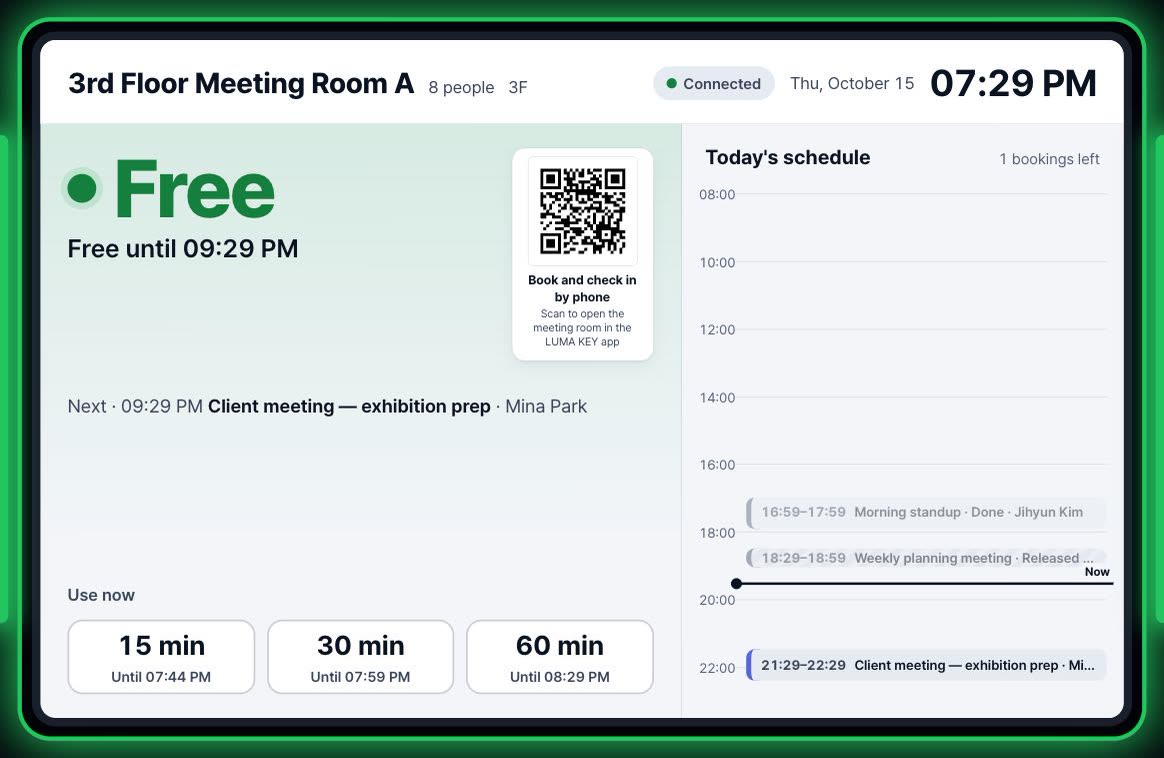
Current and next meeting at a glance

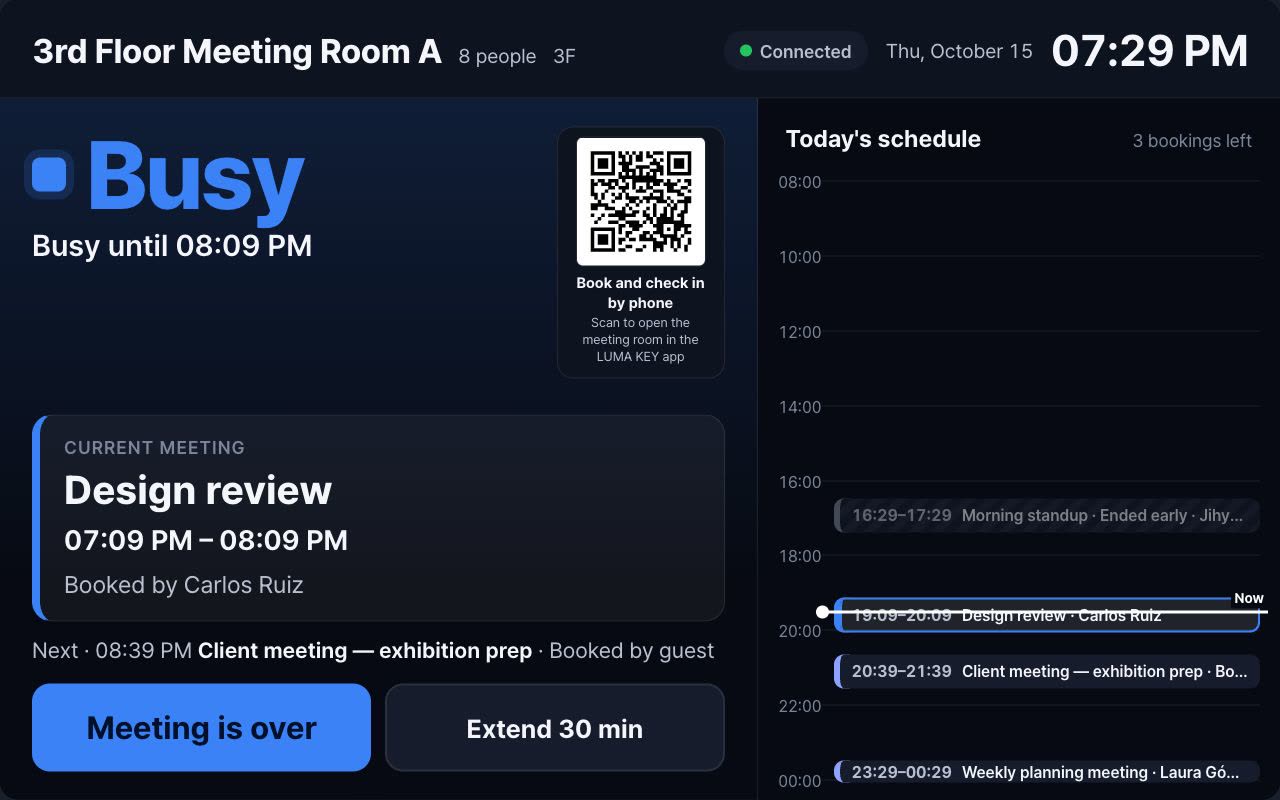
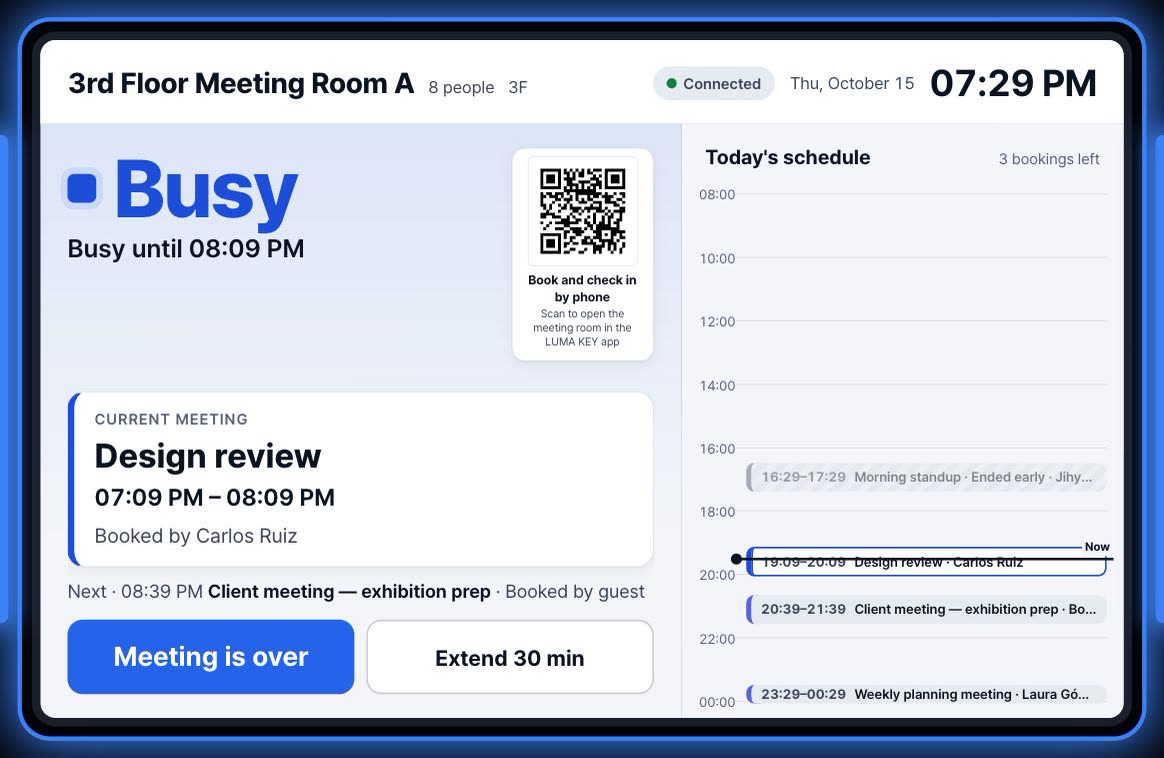
The 10-inch panel beside the door shows the current meeting, the next one and the rest of today's schedule.

Book now, checked in instantly

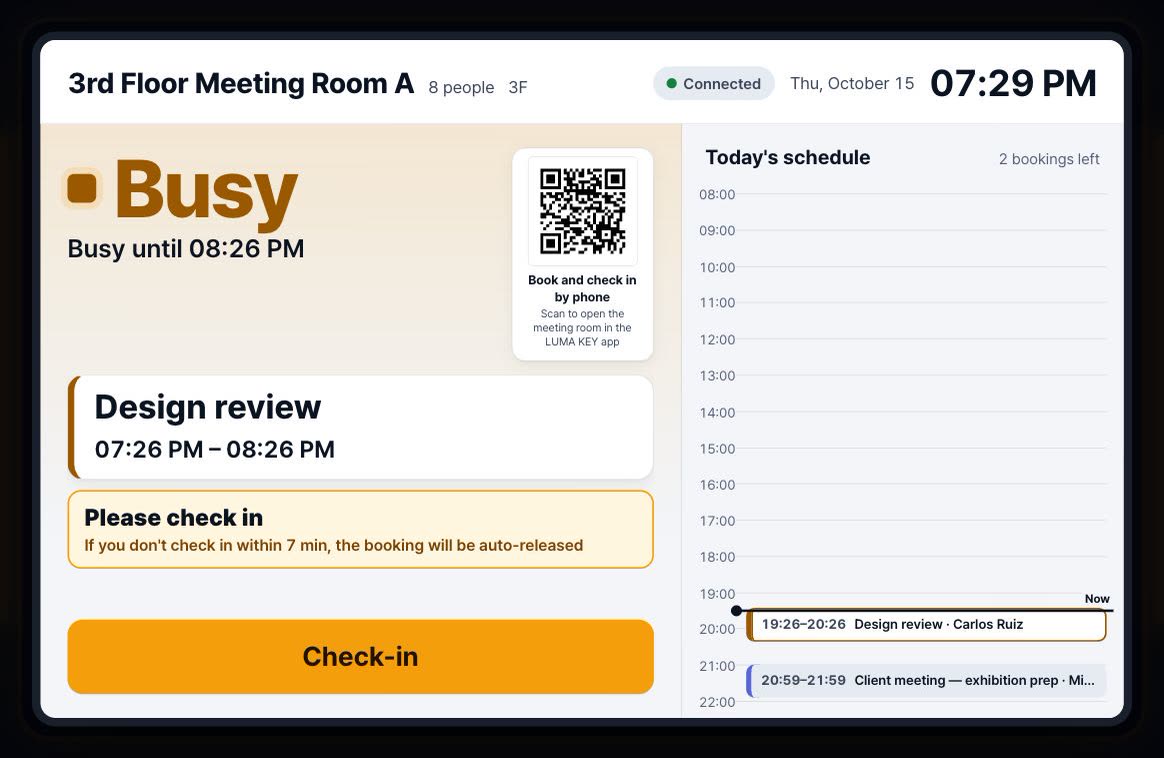
If the room is free, book it on the panel and you are checked in immediately. Extend or end a meeting early from the panel, too.

QR to book and check in by phone

Scan the panel's QR code with a phone to open that room's booking and check-in page.

Bright by day, dim at night

The panel switches between light and dark themes to suit the time of day.

Panel language per room

Choose each room's panel language from six languages; rooms without a setting follow the organization default.

Five LED colors (LED-equipped devices)

The light bars on both sides of the panel turn green when free, amber when waiting for check-in, blue when in use, red when booking is unavailable and white when the status is unknown — visible from the end of the hall.

03 / 04

No-shows and rules

LUMA Meeting Room — No-shows and rules

Auto-release without check-in

Bookings that are not checked in within the set time are released automatically, so rooms held but not used come back.

Repeated no-shows cleaned up

If a recurring booking is a no-show three times in a row, the remaining occurrences are canceled and the organizer is notified by email.

Organization-wide rules

Set meeting room rules such as no-show release once in the organization settings and apply them to every room.

04 / 04

Employee phone app and analytics

Meeting room tab in the member app

In the LUMA KEY member app's meeting room tab, employees see rooms free right now, the calendar and their own bookings — and book or check in. By default it is for employees only.

A web app, nothing to install

No app store download — add it to the home screen from the phone's browser.

Meeting room analytics (Pro)

See utilization per room, booked versus actual use and no-show rates by organizer, and decide with numbers whether you need more rooms or fewer.

Know before you open the door — the light tells you

Book it, check in, and unused rooms come back on their own · AI-generated video

Equipment

Runs on this equipment

10″ door panel

A 10-inch touch screen mounted beside the meeting room door — set the device role to meeting room in the console and it becomes a panel

Required

LED light bars (LED-equipped devices)

Show the room status with light on both sides of the panel — works only on devices with LEDs

Optional

Employee phone

Book and check in from the member app's meeting room tab — add it to the home screen, no app store needed

Required

Admin PC & phone

Manage rooms, bookings and rules in the LUMA console (web) — all you need is a web browser

Required

How it works

From setup to operation

A day in the life of one meeting

  1. The organizer picks a free room in the console or on their phone, books it and adds attendees
  2. The organizer and attendees receive a booking email
  3. At meeting time, the door panel and LED switch to waiting for check-in
  4. The organizer checks in on the panel or with the phone QR, and the LED turns to in use
  5. If the meeting runs long, extend it on the panel; if it ends early, end it there and free the room

A booking nobody shows up for

  1. The booking time passes with no check-in
  2. After the set time, the booking is released automatically
  3. The panel and LED return to free, and someone else can use the room right away
  4. If a recurring booking is a no-show three times in a row, the remaining dates are canceled and the organizer is emailed

Use cases by industry

How these stores use it

Headquarters & offices

In an office that always seems short of rooms because bookings go unused

requiring check-in and releasing bookings without one

leaves only real meetings on the calendar, so you make better use of existing rooms before building new ones

Shared offices

In a space where several member companies share meeting rooms

showing room status on door panels and LEDs and letting people book and check in by phone QR

cuts down on "who's in there?" questions and lets people spot a free room from the hallway

School & academy seminar rooms

Where seminar and study rooms are booked out by the hour

combining calendar booking with automatic no-show release

reduces double bookings and rooms tied up while empty

Get started

LUMA Meeting Room, tailored to your store

Tell us your store size and the equipment you use, and we'll recommend the right setup and quote. We'll also check your existing screens and printers.

  • Live demoWe'll walk you through ordering, publishing, and management on real screens.
  • Custom setup & quoteWe pick only the solutions and equipment you need based on your industry, seating, and screen count.
  • Remote support after installationCheck device status in the console, and if an issue comes up, we'll help resolve it remotely.

Specs

Booking
Console calendar (day · week) · member app on employee phones · instant booking on the door panel
Overlap protection
Bookings for the same room and time are blocked when saved
Door panel
10-inch touch · current / next meeting · check in · extend · end · phone QR · day / night themes
LED status
Green free · amber waiting for check-in · blue in use · red unavailable · white unknown (LED-equipped devices)
No-shows
Auto-release without check-in · series canceled with email after 3 consecutive no-shows
Notifications
Booking email · add-to-calendar link · guest invitation link (view-only · expires)
Screen updates
Refreshed at short intervals
Time zone & languages
Based on the room's time zone · panel in 6 languages (set per room)
Analytics (Pro)
Utilization · booked vs. actual use · no-show rate by organizer
Data
Stored separately for each organization
Frequently asked questions

Does it connect to Outlook or Google Calendar?

Each booking email includes an add-to-calendar link so attendees can put the meeting in whatever calendar they use. The room bookings themselves are managed in the LUMA console, the member app and the door panels.

What happens if nobody checks in?

If no one checks in within the set time, the booking is released automatically so others can use the room. If a recurring booking is a no-show three times in a row, the remaining occurrences are canceled and the organizer receives an email.

Do all panels have the LED?

The LED works only on supported devices with light bars. Panels without LEDs show the same status on screen.

Do employees need to install an app?

No. They add the LUMA KEY member app to their home screen from the phone's browser and book or check in from its meeting room tab. By default it is for employees only.

Does it record or summarize meetings?

No. LUMA Meeting Room focuses on booking, check-in and no-show management with door panels and LEDs. Let us know what else you need when you contact us.

How much does it cost?

It depends on the number of rooms and panels. See the Pricing page, or contact us and we will recommend the right setup and send a quote.

Tailor it to your store now.

Our team will help you work out the setup and quote.

Contact sales All solutions
LUMA Meeting Room — LUMA AI STUDIO